
+ 65 6265 0666
  • News Centre
    • Press Releases
    • Feature Stories
    • Port Circulars
    • Corporate Social Responsibility
  • JP Connectivity
  • Pass Application
  • JP-Online
  • Tender/RFx
Jurong PortJurong PortJurong PortJurong Port
  • Why Us
  • Multipurpose Terminals
    • General and Bulk Cargo
      • Project Logistics Hub & Projects Showcase
      • Offshore Marine Centres
      • General / Break Bulk
      • Ro/Ro
      • Dry and Liquid Bulk
    • CONSTRUCTION
      • RMC Ecosystem
      • Cement Terminal
      • Steel Terminal
    • LIGHTERAGE
      • Lighter Terminals
    • Containers
      • Conventional Containers
  • Energy Terminals
    • Jurong Port
      Tank Terminals
    • Jurong Port
      Universal Terminal
  • About Us
    • Overview
    • International Presence
      • China
        • Rizhao Port Jurong Terminals (Rizhao)
        • SDIC Jurong Yangpu Port (Hainan)
      • Indonesia
        • Marunda Center Terminal (Jakarta)
    • Awards & Milestones
    • Leadership
    • Business Partnerships & Licensed Stevedoring Companies
    • Port Layout
    • Environmental, Health & Safety
    • Sustainability
    • Port Rules & Regulations
    • Whistleblowing Policy
  • Join Us
    • Job Opportunities
    • Internship and Scholarship
    • JP Academy
  • Contact Us
    • Contacts & Locations
    • Enquiries
  • FAQs

FAQs

Passes & Permits

  • Safety & Security
  • Accounts
  • Passes & Permits
  • Businesses / Services
  • Storage
  • Operations
  • Documentation
  • Invoicing & Payments
  • Stowage Requirements
  • Mobile Apps
Home FAQs Passes & Permits

Pass Application

Pass/Permit Office Operating Hours

E

What are the operating hours of the Pass and Permit Office?

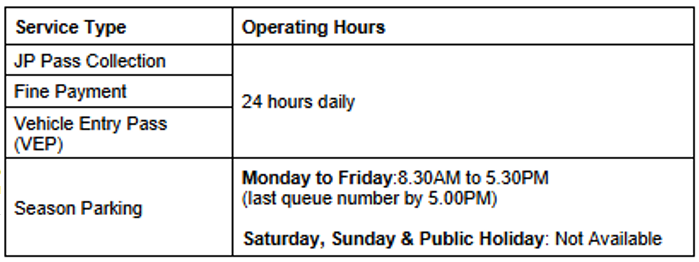
The Pass Office operates on a 24-hour basis. JP Pass collection, fine payment, Vehicle Entry Pass (VEP) issuance, and Season Parking applications can be done over the counter. The operating hours for each service are as follows:
Contact No.: 6660 9059, 6660 9515 or 6660 9087
Email: passoffice@jp.com.sg
Definition of JP Pass

e

What is JP Pass?

What is JP Pass?
The JP Pass is required for all port users to enter the port. It offers flexible, duration-based access, with validity ranging from 1 day to 3 years, customised to users’ work assignments.

How long can I set the duration for my JP Pass?
The pass duration must not exceed the earliest expiry date of your Work Permit/S Pass/Employment Pass, Passport or Contractor Permit (CP). Any excess fees paid due to incorrect duration selection will not be refunded.

How can I apply for JP Pass?
Applications for the JP Pass are now available via the web and mobile applications only. To apply, visit https://jppass.jp.com.sg/ or use the mobile app to create an account.

Over-the-counter applications are permitted for foreigners whose country code is not available in the drop-down menu during registration. They will need to present a valid sponsor letter.

Who is eligible to apply for the JP Pass?
The JP Pass is available to users who are sponsored by a JP credit account holder.

What are the requirements for account registration and pass application?
Government-issued Photo ID and necessary supporting documents must be submitted in digital format as part of the pass application process.

For Account Registration:
1. Government-issued Photo ID:
– Singaporean/PR: NRIC; or
– Foreigners: Work Permit / S-Pass / Employment Pass or Passport
Note: Pass applications for foreign nationals without a Singapore work pass will be approved on a case-to-case basis and may require submitting an e-Notification to Perform Work Pass Exempt Activities.

2. Phone Number with a Supported Country Code and Email Address:
A unique handphone number and email address are required for account registration. Only phone numbers with supported country codes from the registration drop-down menu can be used. Duplicate handphone numbers or email addresses are not allowed.

For Pass Application:

Registered Employer Name:

  • Individuals and companies must have a registered employer name in JP before applying for the JP Pass. If the employer is not registered, they must contact Pass Office at passoffice@jp.com.sg or JP Customer Service via Enquiries | Jurong Port Singapore to create a Company Profile before applying.
  • Registration can be done in person at the Pass Office on the same day as the pass application. However, it is advisable to reach out beforehand for a smoother process.

Supporting Documents:

  • Delivery Order / Invoice, Custom Permit and/or ESN (for daily or ad hoc deliveries).
  • Relevant licence or training certifications for application of occupation code.
  • Endorsement letter/email from a JP staff member of P8 grade or above (if sponsored by Jurong Port (JP) or JPTT).

Note: Jurong Port Pte Ltd must be selected as the sponsor company.

All pass replacement requests must be accompanied by a letter from the user company. If the pass is lost, a police report must also be provided.

Contractor Permit – Approval must be obtained before carrying out any form of maintenance, repairs, or other ancillary works on a vessel and/or at the open yard or warehouse.

Note: Any physical amendments to the original Supporting Documents will not be allowed and the application will be rejected.

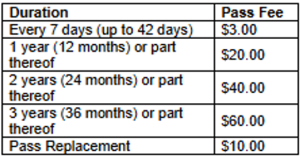
What are the fees for the JP Pass and its replacement?
The fees for the JP Pass are based on the duration of the pass. Please refer to the table below for the specific fee structure.

Replacement fees apply for lost or damaged passes. Please note that all fees and charges are non-refundable, regardless of the outcome of the application. Additionally, the fees are subject to change, so please check for any updates at the time of application.

What is the payment mode accepted for JP Pass applications?
Payment for the JP Pass application can be made via PayNow or Debit/Credit card.

There is a physical card expiry date printed on the card. What does it mean?
The physical JP Pass issued is valid for 3 years from the date your first application is approved. However, the validity of the entry pass is subject to the application. You can renew the pass as many times as needed for entry to the port, as long as the card remains undamaged and in good condition.

How do I check the duration or validity period of my JP Pass?
The JP Pass is issued with a custom validity period, ranging from 1 day to 3 years, depending on your work assignment. To check the exact pass validity period of your pass, simply log in to the web portal or mobile app.

e

Applying for JP Pass

What should I do if my country code is not available in the drop-down menu during JP Pass registration?
If your country code is not available in the drop-down menu, you must apply for the JP Pass in person at the counter. You will need to present a valid sponsor letter, which should be sent via email to passoffice@jp.com.sg. All other applicants can apply via the web or mobile app.

How do I register for a JP Pass account?
To create an account on the JP Pass Web Portal or mobile app, users must provide a unique handphone number and email address, as duplicates are not allowed. Follow these steps to complete your registration:

Registration Process:
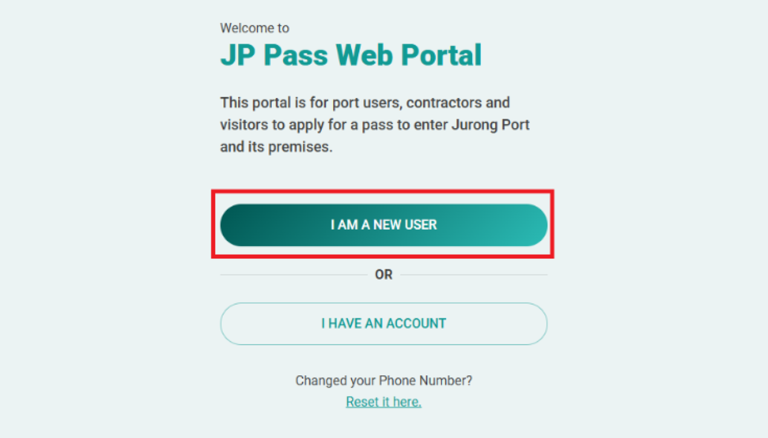
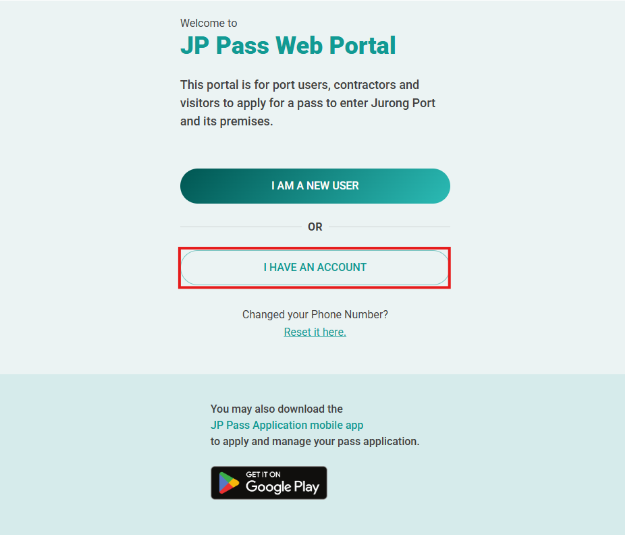
1. Visit the JP Pass Web Portal at https://jppass.jp.com.sg/ or use the mobile app to start the registration process.
2. Click on the “I AM A NEW USER” button on the login page.

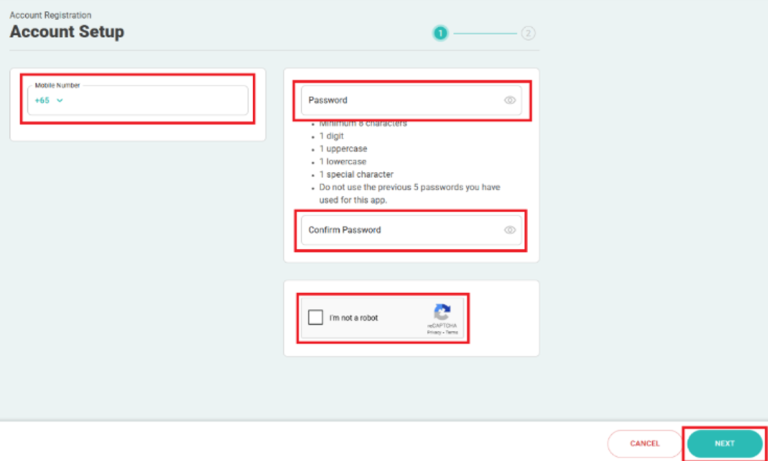
3. To set up an account, enter your mobile number, create a password, click on the reCAPTCHA checkbox, and click “NEXT” to complete the registration process.

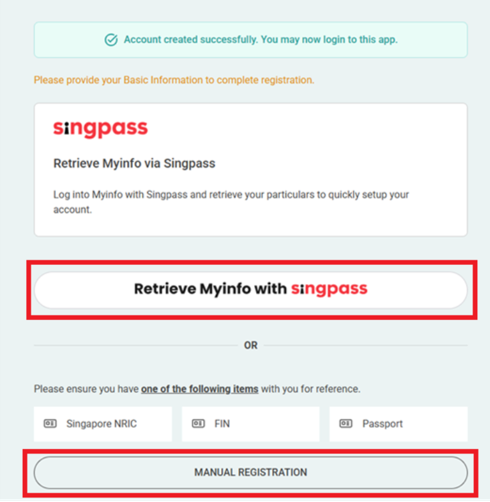
4. After clicking “NEXT,” a confirmation message will appear, indicating that your JP Pass account has been successfully created. You will then be directed to provide your basic information, either by retrieving it through Singpass or entering it manually.
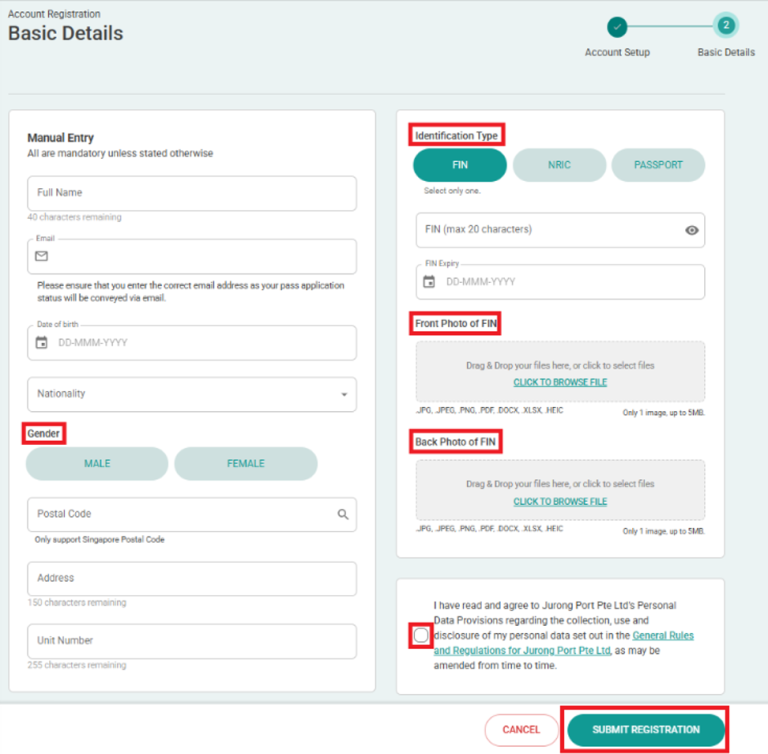
If you selected “MANUAL REGISTRATION,” you’ll be redirected to the Account Registration – Basic Details page. Enter the required information, click the link to review the General Rules and Regulations, check the box to confirm your agreement, and then click “Submit Registration.”

What is the process for JP Pass application?

The JP Pass is available to all users sponsored by a JP credit account holder.

Application Process:

1. Visit the JP Pass Web Portal at https://jppass.jp.com.sg/ or use the mobile app to apply pass

2. Login using your credentials, complete OTP verification and click “NEXT”

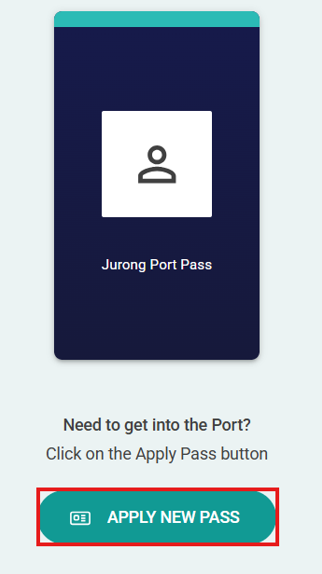
3. Click on “Apply New Pass” and complete the application form

4. When the application has been submitted successfully:

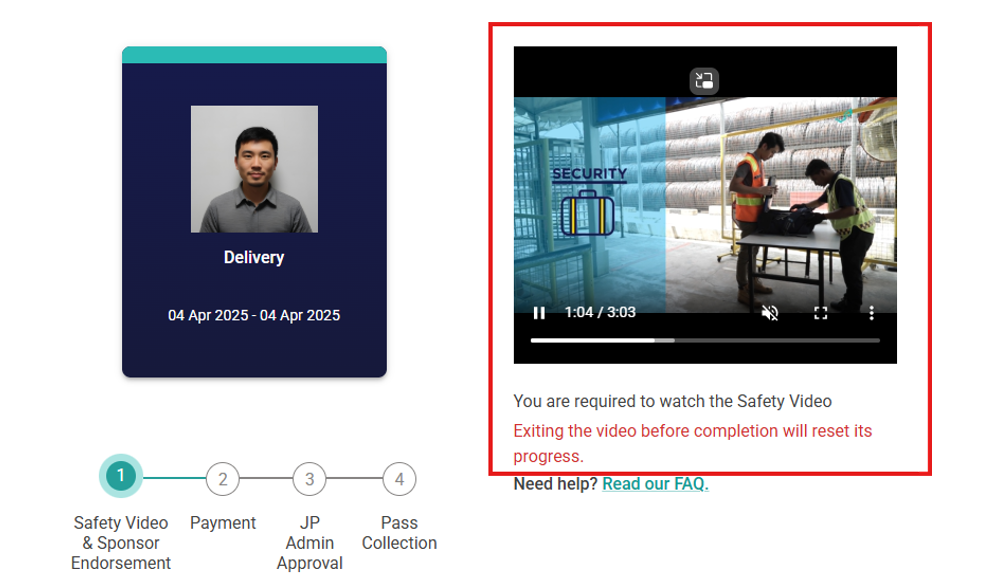
  • Watch the mandatory safety video – This is a required step for all applicants and must be completed before your application can proceed
  • Sponsor Company Endorsement – Your application is now pending endorsement from your sponsor company. You will be notified once this process is complete
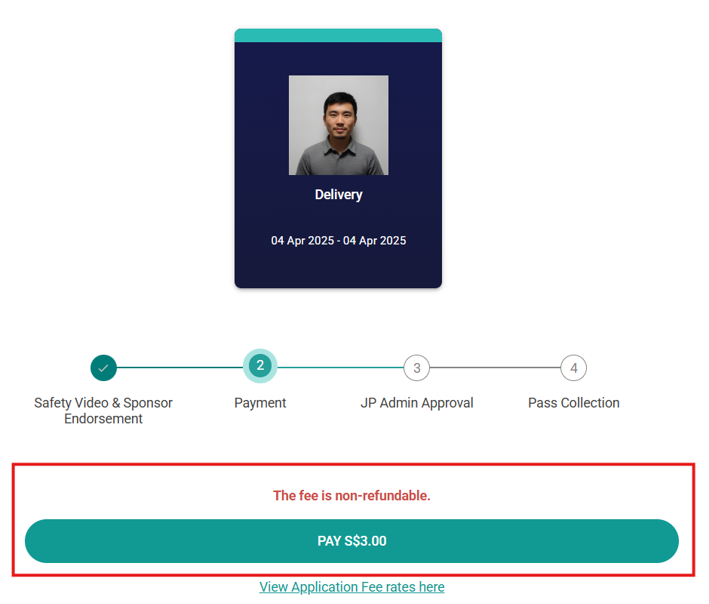
  • Online Payment – Once your application is endorsed, you will be prompted to complete the online payment to finalise your submission
  • Note: Please note that the application fees are non-refundable. We recommend ensuring that all information is correct before submitting and endorsing your application

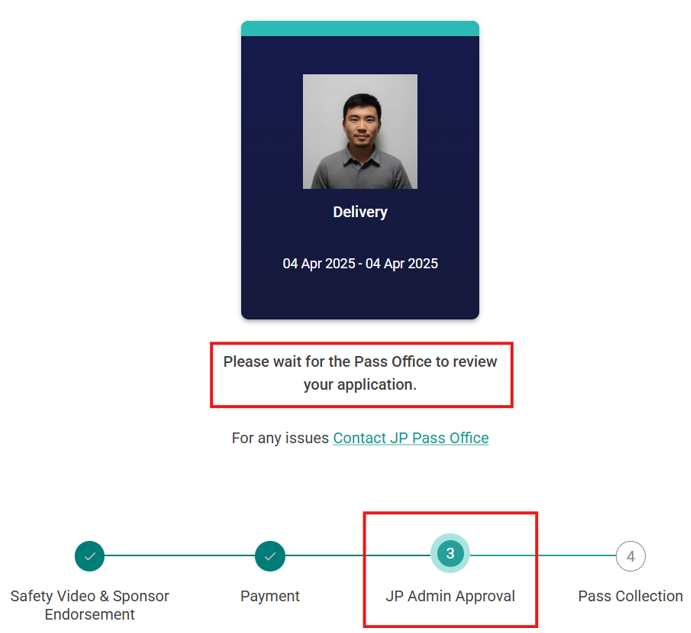
5. Once the payment is successful, the Pass Office will review the supporting documents for verification before approving the application

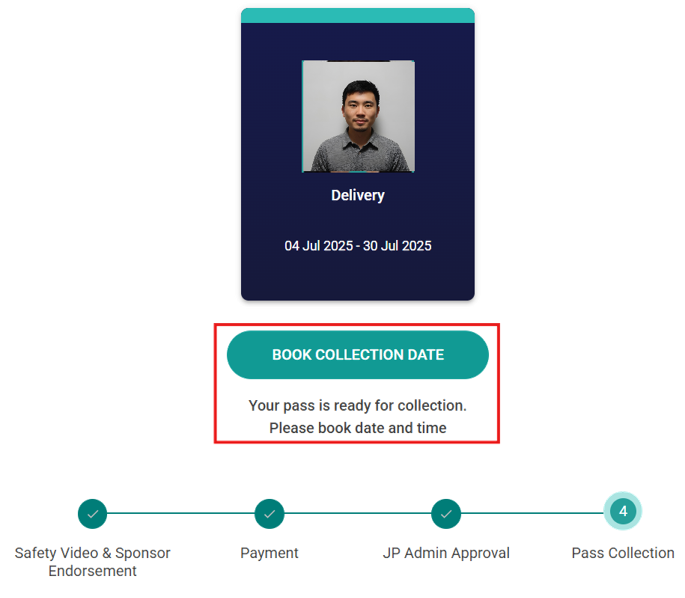
6. If your application is approved, you will receive a notification to book an appointment for pass collection

7. Please arrive at the Pass Office at your selected timeslot to collect your pass. You must come in person for pass collection to complete biometric enrolment. Additionally, you are required to bring your government-issued ID for verification

Can I apply for JP Pass in advance?
Applications for the JP Pass can be done up to 60 days in advance. The application form must be pre-filled and submitted online.

Can I request expedited or urgent processing for my application?
For urgent applications, you may request same-day processing and pass issuance at the Pass Office. For all other applications, processing may take up to five (5) days from the date you submit a fully completed application. To allow sufficient time for processing, please submit your application or renewal at least five (5) days before your scheduled visit.

e

Application Issues and Follow-Up

I have had my application submitted by a Sponsor Company Admin (SCA), but I have not registered for an account. How do I log in?
After your application is submitted by the SCA, an SMS will be sent to your registered mobile number with your login details. Please ensure that the SCA has correctly entered your mobile number, identification number, and date of birth. The login details will be as follows:

USERNAME: Your mobile number (e.g., 98004500)
PASSWORD: Jp@ + Your date of birth in DDMMYY format (e.g., 011260) + Last 4 characters of your Government ID (NRIC, FIN, or Passport) (e.g., 123A).
Example: Jp@011260123A

What happens if my application is not endorsed by the Sponsor Company?
If an online application is not endorsed by the sponsoring company within 30 days from the date of submission, the system will automatically purge the applicant’s record, and all fees paid will be forfeited.

I forgot to make payment. What happens to my JP Pass application?
If no payment is received for an endorsed an application within 60 days from the date of endorsement, the system will purge the applicant’s record.

What should I do if my JP Pass application is queried by the Pass Office?
If your application is queried by the Pass Office for further clarification on the purpose of entry, occupation code, or employer, please make the necessary amendments and resubmit it within 7 days.

What can I amend if my JP Pass application is queried?
When the application reaches the Pass Office for approval, you may only amend the purpose of entry, occupation code or employer if queries are raised.

What happens if I do not resubmit the requested information after my JP Pass is queried by the Pass Office?
If the Pass Office raises queries on the application and you do not resubmit the required information within 7 days, the system will purge the applicant’s record, and all fees paid will be forfeited.

e

JP Pass Collection

When can I collect my JP Pass?
After completing the safety video, receiving endorsement from your sponsor company, and making payment for the pass fee, your application will be routed to the Pass Office for approval. Once approved, the pass must be collected within 30 days from date of approval. If not collected within this time frame, the pass will be discarded and all fees paid will be forfeited.

How long do I have to collect my approved JP Pass?
The JP Pass must be collected within 30 days from the date of approval. If pass is not collected within this period, it will be discarded and all fees paid will be forfeited.

How do I book an appointment to collect my JP Pass?
You can book an appointment to collect your pass once it has been approved. If you choose to collect your pass before your official start date, please note that it will only be activated on the actual start date.

What do I need to bring when collecting my JP Pass?
You must present a government-issued photo ID (e.g. NRIC, work pass, or passport) for verification. If you have an existing or old pass, please return it to the staff during collection.

Do I need to be present for pass collection?
Yes, applicants are required to come in person to the Pass Office on the scheduled collection date to have their biometrics enrolled onto the JP Pass.

How do I take a queue number during pass collection?
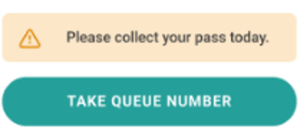
Log in to your JP Pass account and click on “Take Queue Number.” Once your number is called, please proceed to the counter for pass collection.

What should I do if I missed my appointment to collect the JP Pass?
If you missed your appointment, simply log in to the JP Pass web portal or mobile app to book a new collection date.

Do I need to come to the Pass Office for renewal?
No. Subsequent renewals and payments must be done through the web portal or mobile app. Just ensure that your renewal application is approved before entering the port.

e

JP Pass Account Management

How do I reset my JP Pass account password?
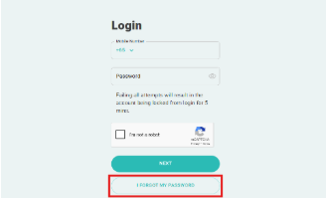
To reset your password, click the “I Forgot My Password” link on the login page and follow the instructions.

I changed my handphone number. Can I use my new number to log in or create a new account?
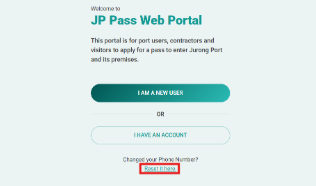
If you’ve changed your mobile number, there’s no need to create a new account. Simply update your mobile number by selecting “Reset It Here” under the “Changed Your Phone Number?” link on the main page. Follow the instructions to update your contact details and regain access to your account.

I forgot my user ID, what should I do?
Your user ID is the handphone number you used during registration. If you’ve changed your number, please refer to the question “I changed my handphone number. Can I use my new number to log in or create a new account?” for the necessary steps.

Will my JP Pass account get deactivated if I don’t use it?
Yes, your JP Pass account will automatically become inactive after 90 days of inactivity. To keep your account active, ensure that you log in or update your account within this period.

e

JP Pass Account Deletion

Can I delete my JP Pass account if I still have an active pass?
Yes, you can delete your JP Pass account even if you have an active pass.

How do I delete my JP Pass account?
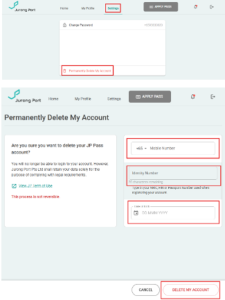
To delete your JP Pass account, go to the “Settings” section and click on “Permanently Delete My Account.” On the “Permanently Delete My Account” page, enter the required information and click “Delete My Account“.

How long will it take before my JP Pass account is deleted?
Your JP Pass account will be deleted immediately upon request.

Can I cancel my request to delete my JP Pass account?
No, once the deletion request is submitted, it cannot be cancelled.

What will happen to my pass after my JP Pass is deleted?
The active pass will be cancelled, and all fees paid will be forfeited.

Can I use the same handphone number after deleting my JP Pass account if I decide to create a new one?
Yes, you can use the same handphone number to create a new account if you decide to re-register.

e

Sponsor Company Admin – Specific Information

What is the role of Sponsor Company Admin (SCA)?
A Sponsor Company Admin (SCA) is responsible for reviewing and endorsing applications for JP Pass on behalf of the company, as well as third-party entities like vendors or subcontractors. If any details in the application are incorrect, such as the pass duration, applicant details, purpose of entry or occupation code, the SCA should reject the application. The applicant must then reapply with the correct information.

Key responsibilities include:

  • Reviewing applications to ensure compliance with Jurong Port policies and relevant regulations.
  • Managing access rights to ensure only authorized individuals can endorse applications.

Note: Sponsor Admin cannot endorse their own application. We recommend that your company appoint at least two representatives, unless the admin does not need to apply for a Jurong Port pass.

I already have a JPOnline User ID to endorse Long Term Pass (LTP) applications in the previous system. Can I use it to log in to JP Pass?
The JP Pass application uses a different platform from JPOnline. As a result, your JPOnline user ID is different from your JP Pass user ID, and a separate account must be created for this purpose.

How do I register as a Sponsor Company Admin for endorsement activities?
If your company is authorized to act as a Sponsor Company, please have your designated Company Representatives create a JP Pass account for endorsement activities (please refer to the step-by-step guide on creating a JP Pass account for detailed instructions).

Once the account is set up, kindly notify us at passoffice@jp.com.sg so we can grant the necessary endorsement access.

e

Sponsor Code

What is a Sponsor Code?
A Sponsor Code is a unique code generated by SCA within the JP Pass system. It allows employees and vendors to bypass the endorsement process when submitting their pass applications, making the application process faster and smoother.

Who can generate Sponsor Codes?
Only SCA have the authority to generate and issue Sponsor Codes to their employees, vendors, or subcontractors.

How do I generate Sponsor Codes?
Follow these steps to generate a Sponsor Code:
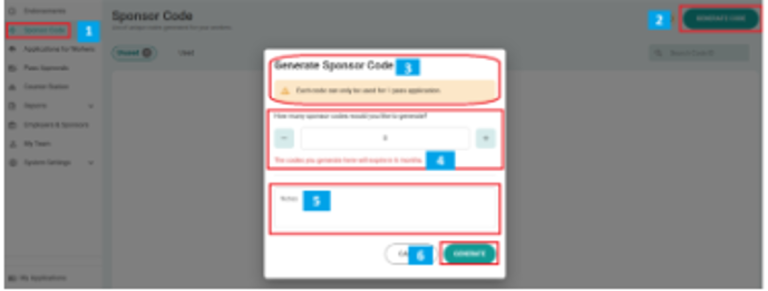
1. Click on the Sponsor Code menu option.
2. Click the Generate Code button.
3. A prompt will appear (see illustration).
4. Select the number of Sponsor Codes to generate using the “-” and “+” buttons.
5. (Optional) Enter any notes related to the codes.
6. Click the “GENERATE” button.

The system will create the unique Sponsor Codes, which you can then distribute to employees or vendors.

Can Sponsor Codes be reused?
No, each Sponsor Code is unique and can only be used once per application. The codes you generate will expire after 6 months.

e

Bulk Application

How can SCA submit applications for multiple applicants?
A SCA can submit multiple pass applications at once using the bulk application feature, as long as the applications share the same purpose of entry, occupation code, and pass duration.

I want to submit applications on behalf of employees, but they have different purpose of entry, occupation codes, or pass durations. What should I do?
If employees have different purposes of entry, occupation codes, or pass durations, you must submit separate bulk applications for each group.

While the Pass Office may query the application, please note that the purpose of entry, occupation codes, and pass durations cannot be amended. Incorrect information may lead to application rejection, and all fees paid will be forfeited.

Do individual applicants need to acknowledge and consent to the PDPA clause when I submit a bulk application?
Unlike the individual application process, bulk applications do not include a platform for individual applicants to directly acknowledge and consent to the Personal Data Protection Act (PDPA) clause. By proceeding with the bulk application, you confirm that all individuals included have been informed of and have consented the PDPA clause.

How do I request Bulk Application access?
To request access for Bulk Application, please write to passoffice@jp.com.sg and provide the email address of the SCA who requires the access.

Note: The “Applications for Workers” feature, which allows for bulk application submissions, is accessible only via the web portal.

I have submitted a bulk application on behalf of my employees, but they have not registered for an account. How do they log in?
An SMS will be sent to the registered mobile number. As the SCA, please ensure that the mobile number, identification number, and date of birth are entered correctly. The login details will be as follows:

USERNAME: Your mobile number (e.g. 98004500)
PASSWORD: Jp@ + Your date of birth in DDMMYY format (e.g. 011260) + Last 4 Characters of your Government ID (NRIC, FIN or Passport) (e.g.123A).
Example: Jp@011260123A

Entry into the Port

E

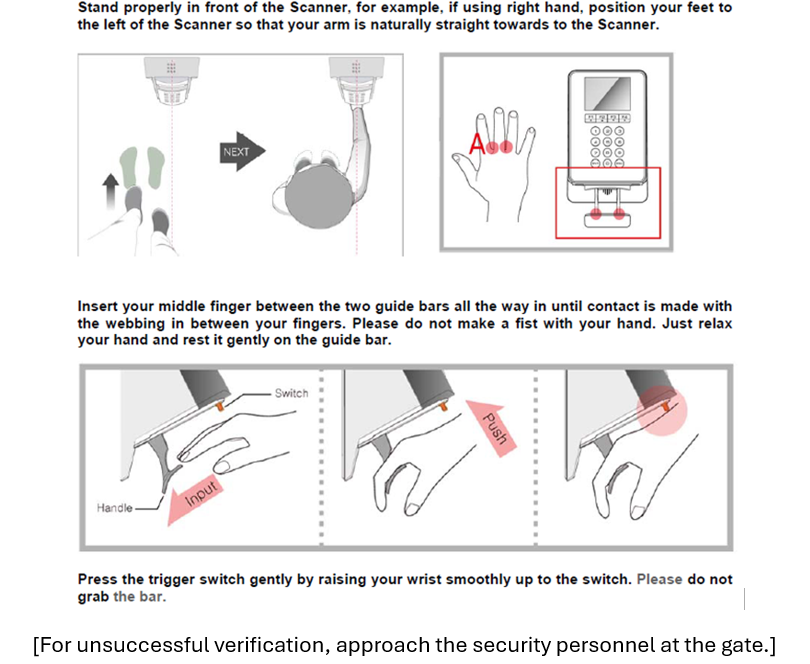
How do I use my JP Pass at the port gate?

(1) Tap JP Pass on the smartcard reader.

(2) Place hand into smartcard reader for biometric scanning.

(3) Upon successful verification, enter and exit the gate through the turnstile.

Photography

E

Is photography or video filming prohibited in the port?

Photography, videography or filming is strictly prohibited in the port.

Approval must be obtained from the relevant department(s) and authorities prior to any photography taking, video recording, or filming activities within the port premises.

The completed and signed application form must be submitted in advance to the JP Security Department (JPSD) Security@jp.com.sg.

For media and publication purposes, additional endorsement from JP Corporate Relations & Communications (CRC) at corpcomms@jp.com.sg is required, and all related materials must be shared with JP CRC prior to publication.

Vehicle Entry Passes (effective 1st April 2018)

Vehicle Registration

e

Is vehicle registration required for entry into the port?

Motorcycles and bicycles are not allowed entry into the port.

All other vehicles, local or foreign-registered, must complete a one-time registration in JPOnline. For those without JPOnline account, you can fill out the Vehicle Registration Application Form and submit it to JP Pass Office at passoffice@jp.com.sg for registration.


Modes of Registration:

JP-Online Application – (customer/port user with both Credit and JP-Online Accounts)

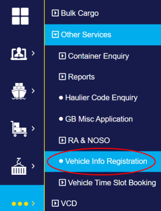
(1) Login to JPOM

(2) Proceed to “Other Services”

(3) Select “Vehicle Info Registration”

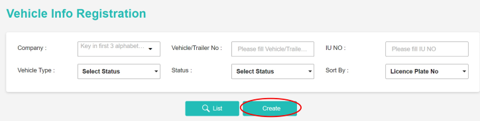
(4) Select “Create”

(5) Enter the relevant information, ie. Vehicle/Trailer no, Name of declarant, Contact No, Vehicle Type, Unladen Weight

(6) Kindly read the Terms & Conditions and select “I agree”

(7) Submit Application

*NO Payment is required for registration of vehicle

Manual Application

(1) Go to https://jponline.com.sg/jppass/ui/home

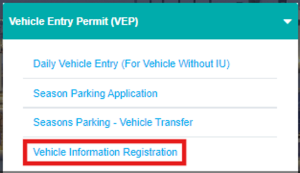
(2) Under “Vehicle Entry Permit (VEP)”, download “Vehicle Information Registration”

(3) Completed form to be submitted to:

  • Pass Office physically OR
  • By email (scanned copy)

The company details, In-Vehicle Unit (IU) number and unladen weight of the vehicle need to be indicated in the application form for both JP-Online and manual registration.

e

Do I require a Vehicle Entry Pass to drive into the port?

Vehicle Entry Pass (VEP) is required for pick-up trucks, panel vans, covered vans and private cars driving into the port. Please ensure your Cashcard has sufficient balance and is inserted into the IU reader during exit.

Daily Vehicle Entry Pass

Local Vehicle: There is no application form for daily VEP. A $2 fee will be deducted during exit, allowing multiple trips within 24hours from the time of entry.

Foreign Vehicle: Foreign vehicle drivers must apply for a VEP at the Pass Office, with a maximum validity of 5 days. The Pass Office will issue a paper VEP, which drivers are required to display it on their dashboard.

(1) Go to https://jponline.com.sg/jppass/ui/home

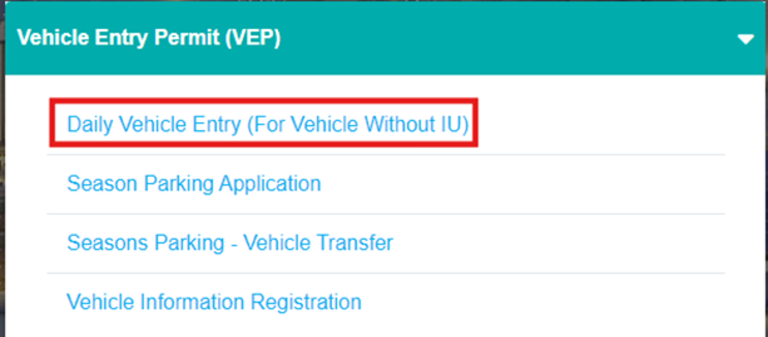
(2) Under “Vehicle Entry Permit (VEP), download ‘Daily Vehicle Entry (For Vehicle Without IU)’


(3) Physically submit the completed form to the Pass Office counter

[Payment is by CashCard, NETS, or contactless mode]


Season Parking Vehicle Entry Pass – (LOCAL VEHICLE ONLY)

(1) Go to https://jponline.com.sg/jppass/ui/home

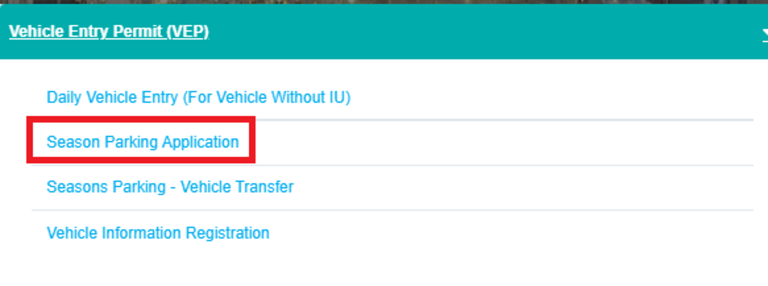
(2) Under “Vehicle Entry Permit (VEP), download ‘Season Parking Application’


(3) Completed form to be submitted to:
• Pass Office physically OR
• By email (scanned copy)

[Payment is by CashCard, NETS, Cheque or contactless payment]

e

How do I qualify for a Season Parking Vehicle Entry Pass?

Season Parking Vehicle Entry Pass is provided to companies that qualify under any of the below-mentioned categories:

  • Tenant
  • Tenant cum Agent
  • Agent (non-tenant)
  • Tenant cum Stevedore
  • Stevedoring (non-tenant)
  • JP Main Contractor
  • Lessee
  • Supplier
  • J1 Basin Operator (Wooden Craft/Barter Operator)
  • Canteen Stall Holders
  • JP Staff
e

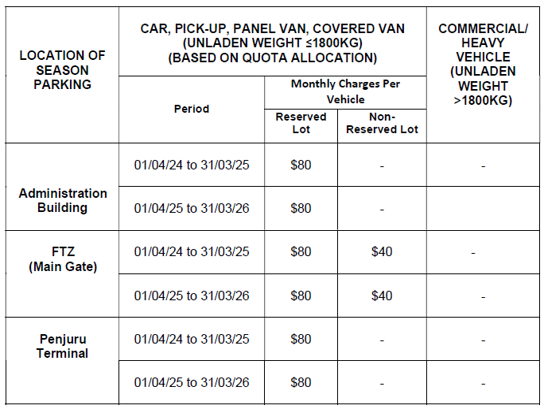
What are the charges for Season Parking Vehicle Entry Pass?

Monthly season parking rates are inclusive of GST.

Have we resolved your concern?  If not, let us help you.

BACK TO FAQS

Jurong Port

Headquartered in Singapore, Jurong Port is a leading international multipurpose port operator handling general, bulk and containerised cargo. Jurong Port began operations in 1965 as a general and bulk cargo port, serving the development needs of Singapore’s Jurong industrial estate. Today, its main gateway terminal in Singapore welcomes more than 15,000 vessels each year from both the region and internationally.

JURONG PORT

  • 37 Jurong Port Road Singapore 619110
  • +65 6265 0666
  • Enquiry Form
PENJURU LIGHTER TERMINAL
  • 42G Penjuru Road

    Singapore 609151
  • +65 6413 9614
  • +65 6316 2072
MARINA SOUTH WHARVES
  • 71 Marina Coastal Drive
    Singapore 018946
  • +65 6413 9617
  • +65 6604 9403
OFFSHORE MARINE CENTRE
  • 101 Tuas South Ave 8
    Singapore 637423
  • +65 6660 9057
  • PLHComm@jp.com.sg
JURONG PORT ACADEMY
  • Jurong Port Admin Building
    37 Jurong Port Road
    Singapore 619110
  • jpacademy@jp.com.sg
Copyright © 2025 Jurong Port Pte Ltd. All Rights Reserved. Terms of Use | Privacy Statement
  • Home
  • Why Us
  • Our Expertise
    • Construction Ecosystems
      • RMC Ecosystem
      • Cement Terminal
      • Steel Terminal
    • Lighterage Ecosystem
      • Lighter Terminals
    • Energy Ecosystem
      • Jurong Port
        Tank Terminals
      • Jurong Port
        Universal Terminal
    • Containers
      • Conventional Containers
    • Other General and Bulk Cargo
      • Project Logistics Hub (& Projects Showcase)
      • Offshore Marine Centres
      • General / Break Bulk
      • Ro/Ro
      • Dry and Liquid Bulk
  • International Presence
    • China
      • Rizhao Port Jurong Terminal (Rizhao)
      • SDIC Jurong Yangpu Port (Hainan)
    • Indonesia
      • Marunda Center Terminal (Jakarta)
  • About Us
    • Overview
    • Awards & Milestones
    • Leadership
    • Business Partnerships
    • Port Layout
    • Environmental, Health & Safety
    • Sustainability
    • Port Rules & Regulations
    • Whistle Blowing Policies
  • Join Us
    • Job Opportunities
    • Internship and Scholarship
    • JP Academy
  • Contact Us
    • Contacts & Locations
    • Enquiries
  • FAQs
  • News Centre
    • Press Releases
    • Feature Stories
    • Port Circulars
    • Corporate Social Responsibility
  • JP Connectivity
  • Pass Application
  • JP Online
  • Tender/RFx
Jurong Port