
What do I need to do after my JP Pass application is approved?
For first-time applicants, you must complete biometric enrolment and ePass activation before you can enter the port.
For applications submitted after 1 October 2026, you can book a biometric enrolment appointment through the JP Pass mobile app or web portal and complete biometric enrolment at the self-service kiosk.
For applications submitted before 1 October 2026, you must take a queue number through JP Pass and complete biometric enrolment over the counter at the Pass Office.
How long do I have to activate my approved JP Pass?
The JP Pass must be activated within thirty (30) days from the date of approval. If the JP Pass is not activated within this time frame, the pass application will be cancelled and all fees paid will be forfeited.
Can I complete my enrolment before my pass start date?
Yes. You may complete your biometric enrolment and ePass activation before your JP Pass start date. However, your ePass will only become active and you will only be able to enter the port from the approved start date of your JP Pass.
For example, if your pass starts on 1 October 2026, your ePass will only be active from 1 October 2026, even if your biometric enrolment is completed on 30 September 2026.
How do I book an appointment for biometric enrolment?
Log in to your JP Pass account and click “Book Appointment.” Select your preferred date and time.
What if there are no available biometric enrolment slots?
Please check JP Pass mobile app or web portal again for the next available appointment slot.
Can I use the self-service kiosk for biometric enrolment?
The self-service kiosk is available for JP Pass applications submitted after 1 October 2026, subject to an approved application and a booked appointment.
If your application was submitted before 1 October 2026, you will need to take a queue number through JP Pass and complete biometric enrolment over the counter at the Pass Office.
What type of ID is accepted for biometric enrolment?
You must present the physical government-issued photo ID used for your JP Pass account registration and pass application for verification. The following are not accepted at the kiosk:
- Digital Work Pass or Singpass documents
- Driving license
Do I need to be present for biometric enrolment?
Yes. Applicants must be physically present to complete biometric enrolment.
Can I enrol my biometric outside Pass Office operating hours?
No. Biometric enrolment is currently available based on the available booking slots. The first booking slot is 7.00am–7.59am, and the last booking slot is 6.00pm–6.59pm.
Note: The biometric enrolment service may be expanded in the future once the kiosk is fully operational.
How do I complete my biometric enrolment using the self-service kiosk?
1. Select “Biometric Enrolment” as the service on the kiosk.
2. Log in to JP Pass and select “View Kiosk QR Code”. Present the QR code to the QR scanner at the kiosk.
3. Place your government-issued photo ID on the document scanner for verification.
4. Once the kiosk QR code and government-issued photo ID have been successfully verified, the approved application will be displayed on the kiosk screen. Select “Next” to proceed.
5. Follow the on-screen instructions to enrol your biometric:
- Insert your middle finger between the two guide bars until it is fully inserted and contact is made with the webbing between your fingers.
- Do not make a fist. Keep your hand relaxed and rest it gently on the guide bar.
- Gently raise your wrist to press the trigger switch. Do not grip the bar.
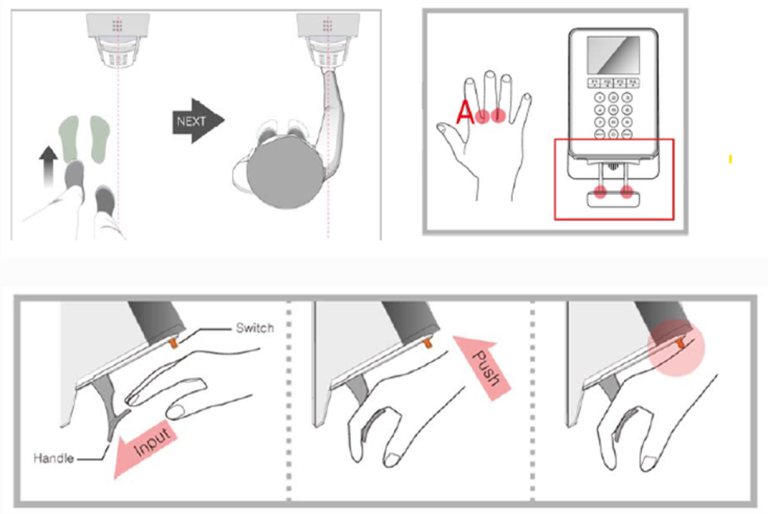 Note: The biometric enrolment process will be performed twice; once to register your biometric and once to verify it.
How many attempts do I have to complete biometric enrolment?
Applicants are given up to three attempts to complete biometric enrolment. A 30-second cooldown period applies between each attempt.
What should I do if the kiosk cannot read my ID?
Please ensure that your physical government-issued photo ID is placed correctly on the document scanner and follow the on-screen instructions. If the kiosk is still unable to read your ID:
- During Pass Office operating hours: Select “Facing Issues with Kiosk” on the kiosk. You will be issued a queue number, and our staff will assist to complete your biometric enrolment over the counter.
- After Pass Office operating hours: Contact the JP Pass chatbot for assistance.
What should I do if I am unable to complete biometric enrolment?
If you are unable to complete biometric enrolment after the available attempts, please contact the JP Pass chatbot for assistance.
What should I do if I miss my biometric enrolment appointment?
If you miss your appointment, log in to the JP Pass mobile app or web portal to book a new appointment.
I have applied for a JP Pass using my IPA as I have not received my physical work pass card yet. How do I complete my biometric enrolment?
Biometric enrolment for applicants using an IPA can be completed over the counter at the Pass Office. Please bring your IPA and valid identification document for verification.
When you arrive at the Pass Office, select “Facing Issues with Kiosk” through JP Pass to obtain a queue number. You will then be assisted over the counter to complete your biometric enrolment.
How do I check the duration or validity period of my JP Pass?
The JP Pass is issued with a validity period ranging from 1 day to 3 years, depending on the user’s work assignment. You can check the exact validity period and expiry date of your pass by logging in to the JP Pass mobile app or web portal.
When do I need to re-enrol my biometric?
Biometric enrolment is required only once. You will need to re-enrol if there is a change to the government-issued photo ID used for your JP Pass account registration and pass application, or if your biometric enrolment does not match the biometric record in the system and you are instructed to complete reenrolment.
When can I enter the port after biometric enrolment and ePass activation?
You can enter the port once your biometric enrolment and ePass activation are completed, and your JP Pass has reached its approved start date.